
How to Download Shipping Bill from ICEGATE — Walbayzon Exporter’s Guide
- walbayzonllp
- Sep 26, 2025
- 3 min read

Introduction
For sellers exporting from India, the shipping bill is a critical export document. Customs authorities use it to clear your goods, and it’s essential for claiming duty drawbacks, incentives, and maintaining transparent records.
ICEGATE (Indian Customs Electronic Gateway) makes this process digital and accessible. In this blog, we’ll walk you through how to download your shipping bill from ICEGATE, specifically with reference to Amazon Global Selling shipments.
What Is a Shipping Bill & Why It Matters
A shipping bill is the statutory document filed by an exporter that declares details like the goods being shipped, their value, exporter/consignee information, and the destination. It is required for:
Customs clearance (to get Let Export Order / Let Ship Order)
Claiming export incentives / duty drawback
Audit / documentation in your export records
Without a valid and downloadable shipping bill, your exports may be delayed or face legal challenges.
Prerequisites: What You Need Before Download
Before proceeding, ensure you have:
Registered ICEGATE user — using your IEC (Importer Exporter Code) or as a Customs House Agent (CHA)
Shipping bill number & date (or a date range)
Authorized Dealer (AD) Code linked
All export formalities (assessment, Let Export Order / Let Ship Order) completed.
Access to E-Sanchit module in ICEGATE for document repository.
If some of these are incomplete, you will not be able to fetch the shipping bill.
Step-by-Step: How to Download Shipping Bill from ICEGATE
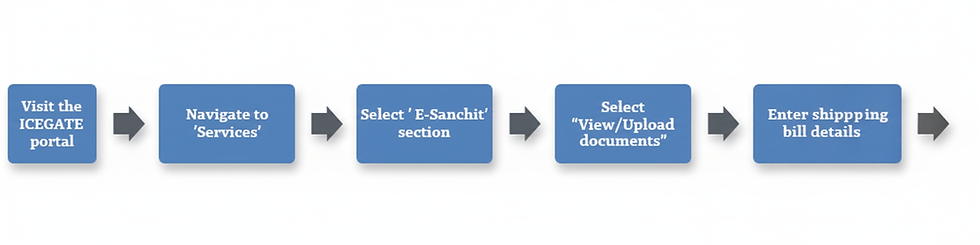
Here’s a stepwise workflow:
Step | Action | Notes / Tips |
1 | Visit ICEGATE portal | Go to the official site of ICEGATE |
2 | Log in with your credentials | Use IEC / user ID & password |
3 | Navigate to Services or E-Sanchit / Documents section | The ICEGATE portal has a menu for document retrieval |
4 | Select View / Upload Documents under E-Sanchit | This is where uploaded / filed export documents reside |
5 | Enter shipping bill info | E.g. shipping bill number, date range, port or customs location |
6 | Submit to search | The system will fetch the documents matching your criteria |
7 | Download the shipping bill copy | The document will typically be in PDF form |
8 | Validate & save | Open and verify details, then archive it in your export records |
Also, ICEGATE provides a Download Utility (ICEGATE 2.0) that can help you fetch copies like “Shipping Bill after Let Export Order (LEO)” etc. (Icegate)
Amazon SEND & ICEGATE: Things to Keep in Mind
When you ship via Amazon Global Selling SEND (cross-border carrier program), Amazon may manage parts of customs clearance and documentation. For example:
Amazon’s partner carrier might directly provide CSB-5 mode shipping bill to you. (Amazon Seller Central)
But for other shipments, especially non-SEND or self-fulfilled exports, you may need to manually download from ICEGATE.
So always check with your logistics partner (or Amazon’s partner carrier) whether they will share the shipping documents or you should download them yourself.
Troubleshooting & Common Issues
Problem | Possible Cause | Solution |
No result found | Wrong shipping bill number or date range | Double-check and widen the date range |
Access Denied / Permission Error | You don’t have E-Sanchit access | Request permissions / roles in ICEGATE portal |
Document not yet uploaded | Customs formalities not completed (LEO / assessment) | Wait for customs to process, then retry |
Document format issues | PDF generation problems | Try again later or contact ICEGATE support |
Summary & Next Steps
Downloading the shipping bill from ICEGATE is essential for export compliance and Amazon Global Selling operations. With the steps above, you can:
Access critical export documents.
Keep your export records in order.
Use them to claim incentives or duty drawback.
At WalBayZon, we assist Amazon exporters with end-to-end export documentation — including ICEGATE walkthroughs, customs assistance, and record management.
Call to Action: Want us to help you set up ICEGATE access, map your shipping bills to Amazon orders, or provide hands-on support for your exports? Reach out to WalBayZon — we’re glad to guide you.


Comments